Data is one of the most valuable assets a business manages. Customer information, employee records, financial documents, passwords, intellectual property, and confidential business files can all be stored on computers and other electronic devices.
But what happens to that information when a device is retired?
Simply deleting files or performing a factory reset may not be enough to permanently remove sensitive information. Depending on the storage device and the method used, data may remain recoverable even after a device appears to be empty.
This is where data sanitization comes in.
Data sanitization is the process of deliberately removing or destroying data so that it cannot be accessed or recovered beyond an acceptable level of risk. The appropriate method depends on the type of storage media, how the device will be used afterward, and how sensitive the information is.
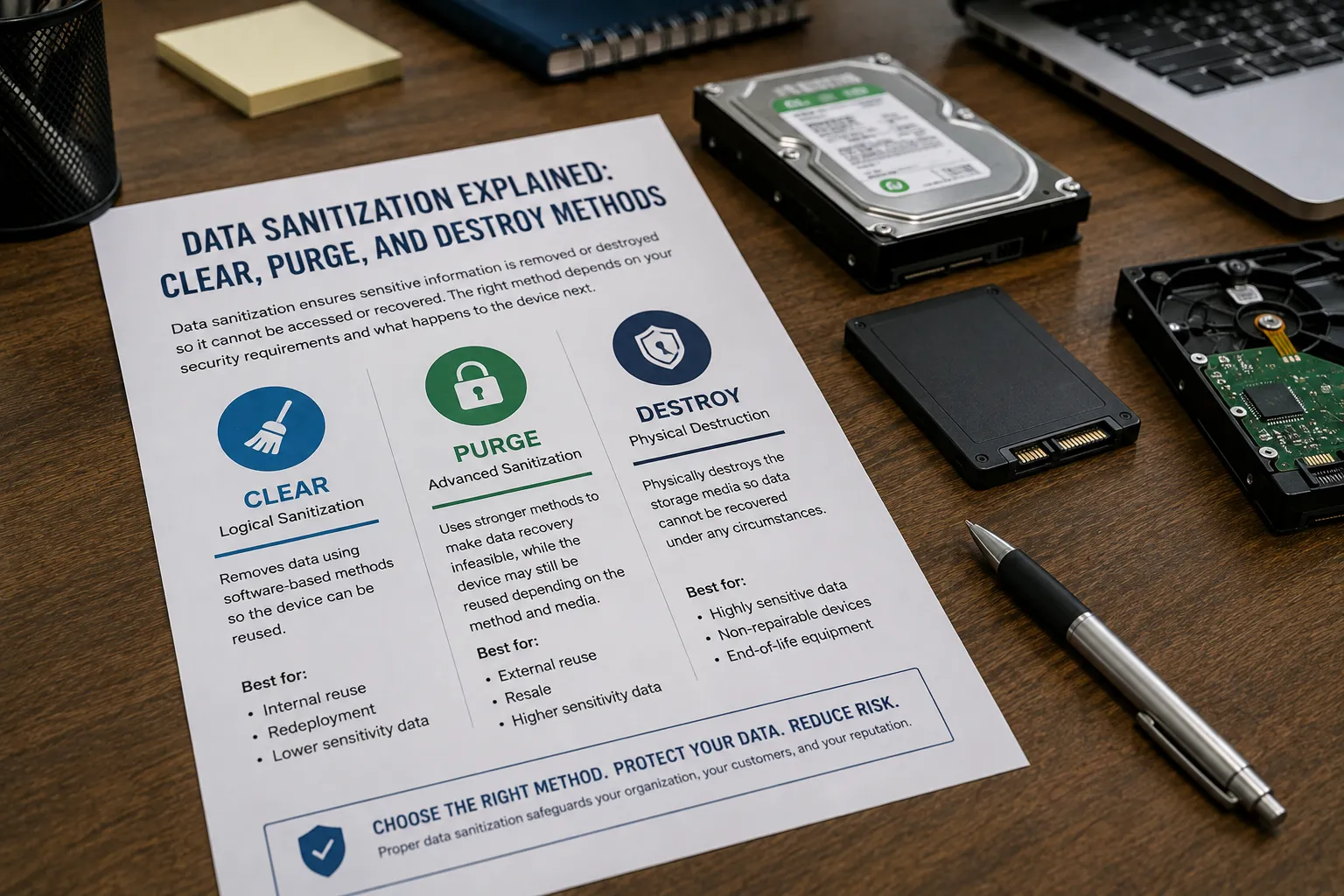
Three commonly used approaches are Clear, Purge, and Destroy.
Understanding the difference between these methods can help businesses make better decisions when retiring computers, servers, hard drives, SSDs, and other data-bearing equipment.
What Is Data Sanitization?
Data sanitization is the process of removing sensitive information from a storage device so that the data can no longer be accessed inappropriately.
It is an important part of the IT asset lifecycle, particularly when equipment is:
- Being replaced
- Transferred to another employee
- Resold or reused
- Returned to a supplier
- Donated
- Recycled
- Retired from service
- Being decommissioned
The goal isn't simply to make the device look empty.
The goal is to ensure that information stored on the device is handled according to the organization's security requirements and the intended final disposition of the equipment.
This is why pressing "Delete" or emptying the Recycle Bin shouldn't be considered a complete data disposal strategy.
The Three Data Sanitization Methods: Clear, Purge, and Destroy
The terms Clear, Purge, and Destroy describe different levels of data sanitization.
While the exact implementation can vary depending on the storage technology and applicable standards, the basic concept is straightforward:
Clear focuses on logical sanitization.
Purge uses stronger methods designed to make data recovery infeasible.
Destroy physically eliminates the storage media.
Choosing between them depends largely on what happens to the device afterward and how sensitive the information is.
1. Clear: Removing Data While Keeping the Device Usable
Clear refers to logical sanitization techniques that remove data from a storage device while allowing the device to remain usable.
This can involve using appropriate software-based techniques to overwrite or otherwise sanitize the areas of storage where data resides.
The primary advantage of clearing is that the device can potentially be reused afterward.
For example, a company replacing its computers may want to sanitize the existing drives before redeploying the machines to other employees.
When Is Clear Appropriate?
Clear may be appropriate when:
- The device will remain within the organization
- The device will be reused
- The data does not require the highest level of sanitization
- The storage technology and sanitization method are compatible
- The organization has appropriate controls and verification procedures
However, businesses should not assume that every storage device can be safely sanitized using the same software-based approach.
Modern storage technologies, particularly SSDs, can behave differently from traditional hard disk drives.
That makes selecting an appropriate sanitization method important.
2. Purge: A Higher Level of Data Sanitization
Purge refers to sanitization methods intended to make data recovery infeasible using commonly available or advanced recovery techniques, while potentially preserving the device for reuse depending on the method and media.
Purge is generally considered a stronger approach than Clear.
The appropriate purge method depends heavily on the type of storage media.
For example, specialized commands or cryptographic techniques may be appropriate for certain modern storage devices, while other technologies may require different approaches.
Historically, degaussing has also been used to purge data from certain magnetic storage media.
However, degaussing is not suitable for every type of storage device. It is generally associated with magnetic media and does not provide a universal solution for modern SSDs and other non-magnetic storage technologies.
When Is Purge Appropriate?
Purge may be appropriate when:
- A device is going to be reused or transferred
- The information stored on it is more sensitive
- The organization needs stronger sanitization than Clear
- The storage technology supports an appropriate purge method
- The business wants to preserve the value of the physical device
For organizations managing large numbers of retired IT assets, choosing the correct purge method can help balance data security and asset recovery.
3. Destroy: When the Storage Device Should Never Be Reused
Sometimes the safest option isn't to sanitize the device for reuse—it is to physically destroy the storage media.
Destroy involves physically damaging or destroying the storage device so that the media containing the information can no longer be used as a functioning storage device.
Depending on the equipment and service provider, physical destruction can involve methods such as:
- Shredding
- Crushing
- Disassembly and destruction
- Other controlled physical destruction processes
Destroy is particularly relevant when storage devices contain highly sensitive information or when the organization has no intention of reusing the device.
When Is Destroy Appropriate?
Physical destruction may be appropriate when:
- The device has reached the end of its useful life
- The storage media is damaged or cannot be reliably sanitized
- Highly sensitive information is involved
- The organization requires physical destruction
- The device will be recycled rather than reused
- A business wants to eliminate the possibility of future device reuse
Once a storage device has been physically destroyed, the equipment can then move into an appropriate recycling or material recovery process.
Clear vs. Purge vs. Destroy
The differences can be easier to understand when viewed together.
| Method | Basic Approach | Device Reusable? | Typical Use |
|---|---|---|---|
| Clear | Logical sanitization | Generally yes | Internal reuse and lower-risk scenarios |
| Purge | Stronger sanitization designed to make recovery infeasible | Potentially yes, depending on method | More sensitive information and asset reuse |
| Destroy | Physical destruction | No | End-of-life or highly sensitive storage media |
There is no single method that is automatically right for every business.
The correct choice depends on the data sensitivity, storage technology, intended disposition of the equipment, and applicable organizational requirements.
Why Deleting Files Isn't the Same as Data Sanitization
One of the biggest misconceptions surrounding retired IT equipment is that deleting files automatically makes the underlying data unrecoverable.
In many situations, deletion simply tells the operating system that the space occupied by a file is available for reuse.
The underlying information may remain on the storage media until it is overwritten or otherwise sanitized.
This means an old laptop sitting in a storage room could potentially contain years of business information even though the files are no longer visible to the user.
The same principle applies to many other devices, including:
- Desktop computers
- Laptops
- Servers
- External hard drives
- SSDs
- USB storage devices
- Backup drives
- Network storage equipment
- Some printers and multifunction devices
Proper data sanitization helps businesses address this risk before equipment leaves their control.
Why SSDs Require Special Consideration
Data sanitization becomes particularly important as businesses increasingly move from traditional hard disk drives to solid-state drives (SSDs).
SSDs store information differently from conventional magnetic hard drives and use technologies such as flash memory and wear-leveling.
As a result, simply applying an old hard-drive wiping approach to an SSD may not always provide the intended level of sanitization.
Organizations should therefore consider the type of storage media before selecting a data destruction method.
This is one reason why professional data sanitization services can be valuable for businesses managing a mixture of older hard drives, SSDs, USB devices, servers, and other storage technologies.
Data Sanitization and the Philippine Data Privacy Act
For businesses operating in the Philippines, secure disposal of personal data is also a privacy and governance consideration. The Data Privacy Act of 2012 and its Implementing Rules and Regulations require personal data to be disposed of securely in a manner that prevents further processing, unauthorized access, or disclosure. The National Privacy Commission also advises organizations to establish procedures for the disposal and reuse of electronic media.
The law does not prescribe one universal sanitization method for every device. Organizations should select appropriate safeguards based on the type of data, the risks involved, the storage medium, and the intended disposition of the equipment.
Data Sanitization Is Part of Responsible IT Asset Management
Data security shouldn't stop when an employee returns a laptop or when an IT department replaces a server.
A device's end-of-life process is part of its overall lifecycle.
A responsible IT asset management process should consider:
- Identifying devices that are being retired
- Determining whether the equipment will be reused, resold, or recycled
- Identifying whether the device contains data
- Selecting the appropriate sanitization method
- Performing the sanitization or destruction
- Verifying and documenting the process
- Moving the equipment into its next appropriate disposition
This approach helps businesses avoid treating data destruction as an afterthought.
Why Documentation Matters
For many organizations, simply saying that data was destroyed isn't enough.
Businesses may need documentation demonstrating that their retired equipment was processed appropriately.
Depending on the service and process used, documentation may include information such as:
- Asset identification
- Serial numbers
- Sanitization method
- Date of processing
- Processing status
- Certificate or other documentation of data sanitization or destruction
- Chain-of-custody information, where applicable
Maintaining these records can provide useful evidence for internal audits, compliance requirements, asset management, and corporate governance.
How Envirocycle Can Help
Managing retired IT equipment can become complicated when businesses have large numbers of devices, multiple storage technologies, or sensitive information that needs to be protected.
Envirocycle provides IT Asset Disposition (ITAD) and secure data destruction solutions designed to help businesses manage retired technology responsibly.
Depending on the asset and its intended disposition, Envirocycle can help organizations determine an appropriate approach to data sanitization, including secure data wiping and physical destruction of storage media when required.
For equipment that is suitable for reuse, appropriate data sanitization can help prepare the asset for its next lifecycle while protecting the information previously stored on it.
For end-of-life equipment, physical destruction and responsible recycling can help ensure that storage media does not continue circulating with recoverable business information.
Envirocycle can also provide documentation associated with the processing of retired assets, helping businesses maintain records of how their equipment and data were handled.
This creates a more complete approach to IT asset disposition—protecting data, recovering value where possible, and responsibly managing equipment that has reached the end of its useful life.
Choosing the Right Data Sanitization Method
The most important thing to remember is that Clear, Purge, and Destroy are not interchangeable terms.
A business should consider several factors before selecting a method:
What type of storage device is involved?
Hard drives, SSDs, USB drives, tapes, and other media may require different approaches.
How sensitive is the information?
Customer data, financial information, employee records, intellectual property, and other confidential information may require stronger controls.
Will the equipment be reused?
If the device still has useful value, an appropriate sanitization method may allow the business to preserve that value.
Is the device being recycled?
If the equipment has reached the end of its useful life, physical destruction may be more appropriate.
Can the process be documented?
Businesses should consider whether they need records demonstrating how their data-bearing assets were processed.
Taking these factors into account helps organizations choose a data sanitization approach that balances security, compliance, sustainability, and asset value.
Data Security Doesn't End When a Device Is Retired
Retiring an IT asset doesn't automatically mean the information stored on it has disappeared.
Whether a business is replacing a handful of employee laptops or decommissioning an entire data center, data sanitization should be considered an important part of the equipment's lifecycle.
Clear, Purge, and Destroy provide different approaches to managing data on retired storage devices. The right method depends on the technology, sensitivity of the information, and what happens to the equipment afterward.
By incorporating secure data sanitization into their IT asset disposition strategy, businesses can reduce the risk of unauthorized data recovery while making responsible decisions about reuse, recycling, and asset recovery.
Because when a device reaches the end of its business life, the data stored on it shouldn't automatically reach the end of its security.